Horror Story Idea Generator: How to Use One (and Get the Most Out of It)
Every horror writer knows the feeling. You want to write something genuinely frightening, but the blank page stares back. The premise feels borrowed. The atmosphere falls flat before it starts.
A horror story idea generator can break that paralysis fast. But knowing how to use one — and what separates a useful prompt from a forgettable one — makes all the difference between a mediocre draft and a story that lingers.
This guide covers what these tools actually do, how to use them well, and what to watch out for along the way.
What Is a Horror Story Idea Generator?
At its core, a horror story idea generator is a tool — digital or otherwise — that produces prompts, scenarios, or full concept outlines rooted in horror. Some generate a single sentence. Others output character sketches, setting details, and a central conflict together.
They work by combining horror-relevant elements: isolated settings, psychological triggers, supernatural threats, unreliable narrators, forbidden knowledge. The better ones let you tune those elements — adjusting tone, subgenre, or narrative style — so the output actually fits what you're trying to write.
Horror as a genre is remarkably broad. Psychological horror, cosmic dread, Gothic atmosphere, slasher tension, folk horror — each has a different engine. A good generator respects those distinctions rather than spitting out the same haunted house setup every time.
Why Writers Use Them (Even Experienced Ones)
According to a 2023 survey by the National Endowment for the Arts, creative block is one of the top three reasons hobbyist writers abandon projects. Idea fatigue is real, and it hits genre fiction writers especially hard — horror audiences have seen a lot.
Using a horror story idea generator isn't admitting defeat. It's using a tool to shift your brain out of its default patterns. Many writers use generated prompts the same way a jazz musician uses a chord chart — as a structure to improvise over, not a script to follow.
Even a prompt you reject teaches you something. You push back against it, and in that resistance, your actual story idea surfaces.
What Makes a Horror Prompt Actually Useful?
Not all prompts are equal. Here's what separates the good ones from the noise:
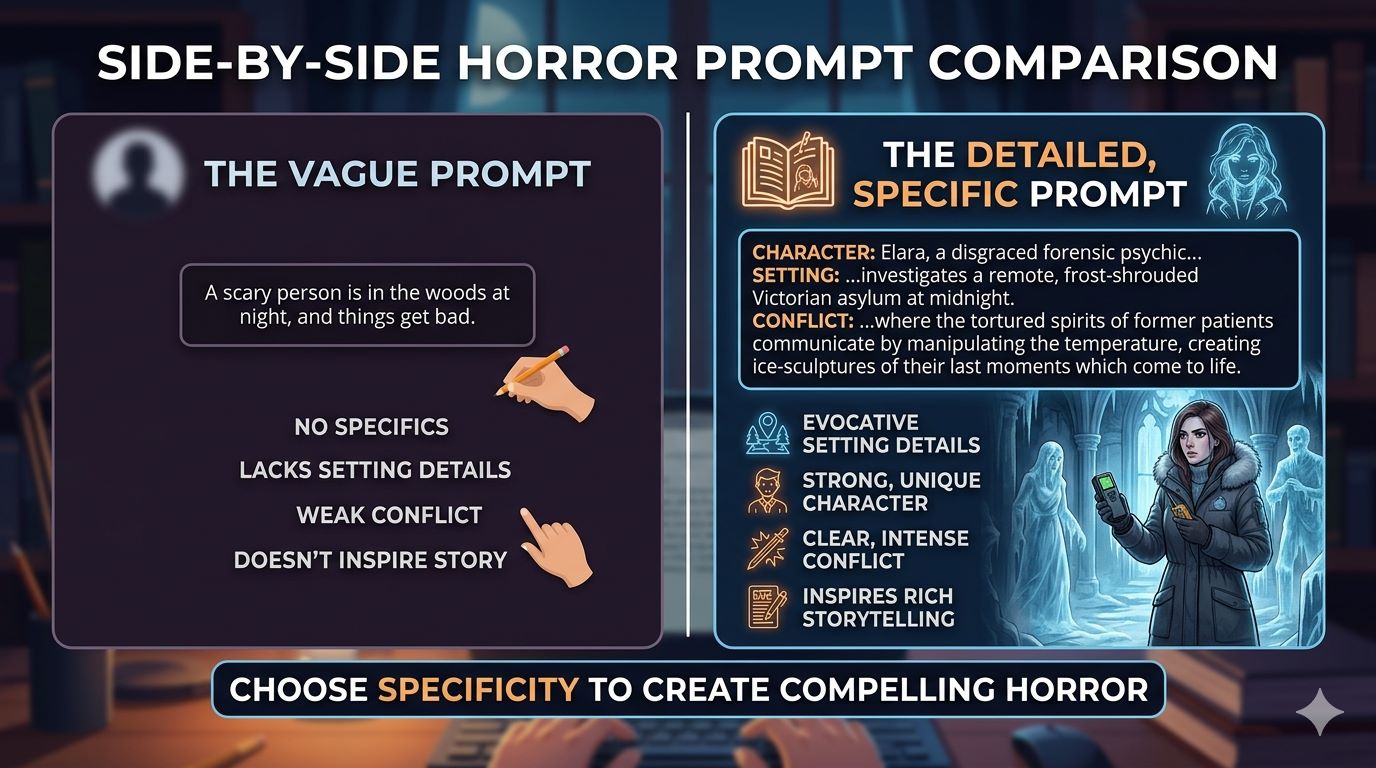
Specificity over vagueness
"A family moves into a haunted house" is exhausted. "A grief counselor starts hearing her dead clients' voicemails — but the timestamps are from the future" is specific enough to spark a real story. The more concrete the setup, the more directions you can take it.
Built-in tension
Good horror prompts contain a conflict that can't be easily resolved. The protagonist wants something. Something in the world of the story wants the opposite. That friction is where horror lives.
A character with something to lose
Stakes matter. A stranger in a scary place is less frightening than a parent trying to protect a child. Prompts that include a vulnerable, motivated character give you somewhere to go immediately.
Tonal clarity
Knowing whether a prompt is pointing toward slow-burn dread or visceral shock matters. A cosmic horror piece and a home invasion thriller use completely different pacing and language. The best generators let you specify this upfront.
How to Use a Horror Story Idea Generator Effectively
Getting value from any idea generation tool comes down to how you interact with it — not just what it outputs.
1. Set your parameters before you generate
Know your subgenre. Know roughly how long your story will be. Know whether you want something grounded in realism or something mythological. Feeding those constraints in upfront gives you output you can actually use.
2. Generate in batches
Don't stop at the first idea that looks promising. Generate five or ten. The patterns you notice — what excites you, what bores you — reveal what kind of horror you actually want to write.
3. Treat the prompt as a starting point, not a blueprint
The best stories come from writers who take a generated concept and ask: "What's the version of this only I could tell?" Your personal fears, your specific memories, your voice — those are what make horror stick.
4. Use the prompt to find the emotional core
Every great horror story is about something beneath the surface. A haunted house story might really be about unresolved guilt. A monster story might be about a toxic relationship. Ask what your generated idea is actually about, and build from there.
5. Keep a swipe file
Not every prompt will be right for today's project. Save the ones that don't fit now. Horror writers who generate and archive ideas consistently report having far fewer dry spells over time.
Common Mistakes to Avoid
Taking the first output too literally. A generated prompt is a raw ingredient, not a finished recipe. Treat it like clay.
Ignoring tone. A prompt with great horror mechanics can fail completely if the tone doesn't match your voice. Make sure the emotional register fits before you commit.
Skipping the "why does this scare people" test. Studies in cognitive psychology suggest that the most effective horror taps into universal fears — loss of control, contamination, death of a child, the uncanny. Ask whether your generated idea touches any of those before you develop it fully.
Over-generating without writing. Some writers get hooked on the generation loop and never actually draft. Set a rule: generate, choose, write — in that order, without cycling back until you have a first scene down.
Where AI-Powered Generators Stand Out
Older prompt generators were essentially randomized fill-in-the-blank machines. AI-powered tools have changed the range of what's possible.
Platforms like Freequill go beyond dropping a single premise in your lap. You can select horror subgenre, narrative tone, and story style before generating — so the output already fits your creative frame. The Plot Twist Engine can inject unexpected turns mid-narrative, which is particularly useful for horror writers who want to stress-test whether their story can sustain surprise.
The Continue Story feature is especially practical. Once you have a strong opening, it lets you extend the narrative without losing the established atmosphere — something that's genuinely difficult to maintain across a longer draft. For a hobbyist horror writer trying to finish a short story in a single evening, that kind of momentum-keeping tool changes what's actually achievable.
A Real Example of the Process
Consider a creative writing student who wants to write her first horror short story but keeps defaulting to familiar setups. She uses an AI horror story idea generator with "psychological horror" and "unreliable narrator" selected. The output gives her a woman who discovers her therapist has been writing letters to her — dated three years before they met.
She doesn't use the prompt as-is. She swaps the therapist for a childhood teacher, adds the detail that her character has no memory of ages seven through nine, and suddenly she has a story about recovered trauma with a supernatural edge. The generator gave her 10% of the story. Her choices gave her the rest.
What to Look for in Any Horror Idea Tool
Whether you're evaluating a free prompt list or a full AI platform, check for these qualities:
- Can you specify subgenre and tone, or is it one-size-fits-all?
- Does it produce prompts with built-in character stakes, or just settings?
- Can you continue developing within the same tool, or do you have to copy-paste into a separate editor?
- Does it impose restrictions that cut off darker thematic territory?
That last point matters in horror specifically. The genre needs to go to uncomfortable places. Tools with heavy content filtering tend to sand off exactly the edges that make horror effective. Freequill's uncensored writing environment is designed to let horror writers work without those constraints — a meaningful distinction for anyone writing in the darker corners of the genre.
Frequently Asked Questions
Can I use generated horror prompts for published work?
Generally yes — the idea itself isn't copyrightable, and what you write from the prompt is your own original work. Always check the terms of service for the specific platform you're using.
Are horror story idea generators good for beginners?
They're arguably more useful for beginners than experienced writers. New horror writers often struggle to identify what makes a premise work. Seeing many generated ideas in sequence teaches pattern recognition faster than most craft books.
How do I avoid all my generated ideas feeling the same?
Change your input parameters deliberately. If you've been generating supernatural horror, switch to body horror or folk horror. Forcing genre variety surfaces ideas you wouldn't have found otherwise.
What if I like the generated story more than my own writing?
That's useful data. Study what the generated version does well — pacing, specificity, sentence rhythm — and bring those elements into your own drafts consciously.
Is there a limit to how many ideas I should generate before writing?
Practically, yes. Most writers find that generating more than ten prompts in a session produces diminishing returns. The goal is to get moving, not to optimize indefinitely.
Ready to Write Something That Actually Scares People?
The best horror story idea generator isn't the one with the biggest database — it's the one that gives you a premise you can make your own. Specificity, tonal control, and the ability to develop an idea past the first spark are what separate a useful tool from a novelty.
If you're ready to stop waiting for inspiration and start building the kind of horror that sticks with readers, start writing for free now and see what happens when creative tools stop getting in your way.
Try it yourself — generate a story now
Fantasy, romance, horror, sci-fi — any genre, any tone. Start free, no credit card.
Generate a Story →